SpaceSniffer 1.3
Latest version • Updated May 2026
SpaceSniffer is a free, portable and incredibly visual disk space analyzer. Its stunning treemap instantly shows you which folders and files are taking up the most space on any drive — internal SSD, external HDD, USB flash drive or even network location.
Unlike traditional tools that show boring lists and numbers, SpaceSniffer turns your entire storage into a beautiful, interactive colored map. Bigger rectangles = more space used. You can zoom in with one click, explore any folder instantly and immediately understand where your gigabytes are going.
Perfect for photographers, video editors, gamers, system administrators and regular Windows users who want to quickly clean up their drives and free up valuable space without wasting time.
Download SpaceSniffer FreeScreenshots of SpaceSniffer
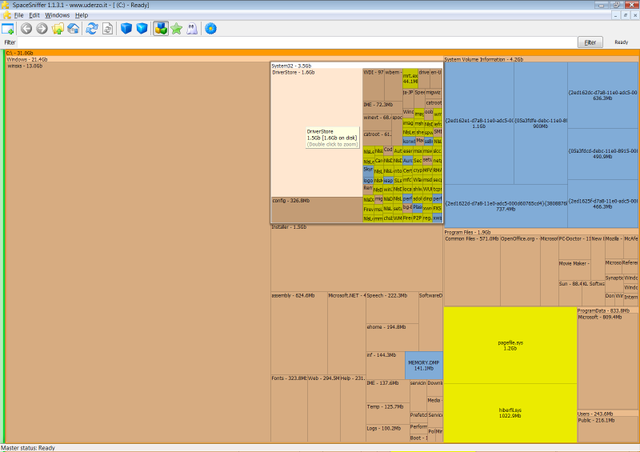
Treemap View
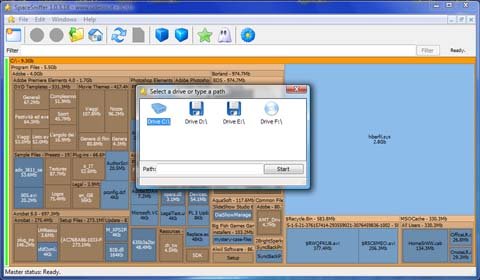
Zoomed Details
.jpg)
Detailed Statistics
About SpaceSniffer
SpaceSniffer is a free, portable and beautifully designed disk space analyzer that uses an interactive treemap to show you exactly where your disk space is being used. It is loved by users who want a visual and intuitive way to analyze storage without complicated interfaces.
Unlike traditional tools that only show lists and numbers, SpaceSniffer displays folders and files as colored rectangles whose size represents the actual space they occupy. You can zoom in and out, click on any folder to explore deeper, and instantly understand your disk usage at a glance.
In version 1.3 (May 2026), SpaceSniffer received improved performance on modern Windows 11 systems, faster rendering of large treemaps, better high-DPI support and enhanced filtering options.
The program is completely portable — no installation is required. Just run the .exe file and start analyzing any drive immediately. It is extremely lightweight and works perfectly on both old and new Windows PCs.
SpaceSniffer has become one of the most popular visual disk analyzers because of its unique and highly intuitive approach. While most other tools present data in boring tables or simple folder trees, SpaceSniffer turns your entire drive into a living, colorful map. Each rectangle represents a folder or file, and the bigger the rectangle — the more space it takes. This visual method makes it incredibly easy to spot space-hungry folders even on very large drives with millions of files.
The program works by scanning your drive and building a dynamic treemap in real time. You can zoom into any area with a simple click, drill down into subfolders, and immediately see what is inside. This makes SpaceSniffer perfect for photographers managing thousands of RAW photos, video editors working with 4K and 8K footage, gamers with huge game libraries, and regular users who simply want to clean up their C: drive before it fills up.
One of the biggest advantages of SpaceSniffer is that it is completely portable. There is no installation process at all. You can copy the single executable file to a USB flash drive and run it on any Windows computer — at home, at work, or even on a friend’s PC. This makes it an ideal tool for IT specialists and system administrators who need to quickly analyze storage on multiple machines.
SpaceSniffer is extremely lightweight and uses almost no system resources. Even when scanning multi-terabyte drives, it runs smoothly in the background without slowing down your computer. You can continue working, browsing, or editing videos while the analysis is happening.
The latest version 1.3 (May 2026) brings noticeable improvements for modern hardware. Scanning speed on NVMe SSDs is even faster, the treemap rendering is smoother on high-resolution monitors, and the program now handles Windows 11 security features and large folder structures more efficiently. The interface has also been refined to feel more modern while keeping the classic SpaceSniffer look that millions of users already love.
Many users combine SpaceSniffer with other tools. For example, after finding large folders with SpaceSniffer, they use WizTree for ultra-fast MFT scanning or TreeSize Free for more detailed reports. However, when you need a quick visual overview and beautiful presentation of your disk usage, SpaceSniffer remains the undisputed champion.
The program supports all common Windows file systems — NTFS, exFAT, and FAT32. You can analyze internal SSDs and HDDs, external USB drives, memory cards, and even network shares. Filtering options allow you to show or hide certain file types, set minimum size thresholds, and customize colors to make the treemap even more readable.
SpaceSniffer is completely free and has no advertisements, no telemetry, and no hidden limitations. It has been actively developed for many years and remains one of the most recommended free utilities in the Windows community. Thousands of positive reviews on forums, Reddit, and tech websites confirm its reliability and usefulness.
Whether you are a creative professional dealing with terabytes of media files, a student trying to free up space on a laptop, or just someone who hates seeing the “low disk space” warning, SpaceSniffer gives you the clearest and most beautiful picture of your storage usage. It helps you make informed decisions about what to delete, what to move to external drives, and how to better organize your digital life.
In 2026, with the growing popularity of large-capacity SSDs and ever-increasing media libraries, tools like SpaceSniffer have become more relevant than ever. Its visual approach saves time and makes the process of cleaning up storage not only effective but also enjoyable.
Key Features
- Stunning interactive treemap visualization
- Zoomable and clickable folder exploration
- Real-time scanning of any drive (internal, external, USB, network)
- Very fast and low resource usage
- Portable version — no installation needed
- Customizable filters and color schemes
- Support for all Windows file systems
- Completely free and open-source
System Requirements
- Windows 11 / Windows 10 / Windows 8.1 / Windows 7
- 512 MB RAM
- 20 MB free disk space
Alternatives to SpaceSniffer
- WizTree — fastest MFT-based scanner
- TreeSize Free — detailed tree + treemap
- WinDirStat — open-source classic
- DiskUsage — simple and lightweight