.png)
LockHunter 3.4.3
Latest version • Updated May 2026
LockHunter is a powerful free tool that helps you unlock, delete or rename files and folders that are locked by other programs or Windows itself. It instantly solves the annoying “file is in use” and “access denied” errors that Windows often shows even when no program is visibly using the file.
With LockHunter you simply right-click on any locked file or folder and choose “LockHunter” from the context menu. The program quickly shows you exactly which processes are locking the file and gives you safe options: unlock and delete, unlock and rename, unlock and move, or safely close the locking process.
Lightweight, portable and trusted by millions of users worldwide, LockHunter remains one of the most effective and easy-to-use file unlockers for Windows 11 and older versions.
Download LockHunter FreeScreenshots of LockHunter
.png)
Main Window
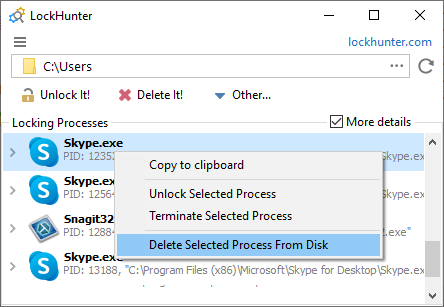
Locking Processes
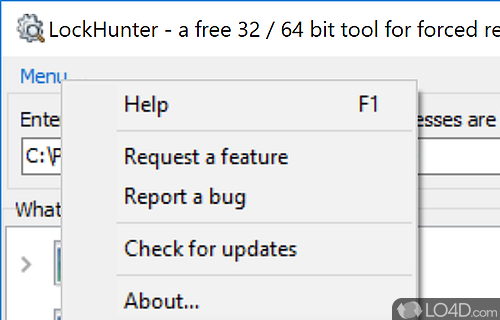
Unlock Actions
About LockHunter
LockHunter is a powerful free utility that helps you unlock, delete or rename files and folders that Windows reports as “in use” or locked by another program.
It shows you exactly which processes are locking the file and gives you safe options to unlock and perform the desired action.
In version 3.4.3 (May 2026), LockHunter received improved Windows 11 compatibility, better detection of modern applications and a cleaner interface.
The program is completely free, lightweight, portable and trusted by millions of users worldwide.
One of the most common and frustrating problems in Windows is when you try to delete, move, or rename a file or folder and receive the error message “The action can’t be completed because the file is open in another program” or “Access is denied”. Even after closing all visible applications, Windows often keeps files locked because some background process, system service, antivirus software, Windows Explorer, or a previously closed program is still holding a handle to it.
LockHunter was created specifically to solve this exact issue. It is a lightweight, fast, and very effective tool that integrates directly into the Windows right-click context menu. When you encounter a locked file, you simply right-click on it, select “LockHunter”, and the program immediately analyzes the situation and shows you a clear list of all processes and applications that are currently locking the file or folder.
What makes LockHunter stand out is its detailed and transparent approach. Unlike simpler tools that only offer a basic unlock button, LockHunter shows you the exact name of the locking process, its path, and PID (process ID). This gives you full understanding and control. You can then choose the safest action: unlock the file without closing anything, unlock and delete, unlock and rename, unlock and move, or safely terminate the locking process if necessary.
The program is especially useful in many real-life situations: cleaning up after uninstalling software that left behind locked temporary files, removing stubborn virus remnants, deleting old game folders, clearing cache and log files that refuse to go away, or fixing problems after a failed software installation. Many users also use it when Windows Update or antivirus programs leave behind locked files that cannot be removed by normal means.
LockHunter is completely portable — there is no installation required. You can run it directly from a USB flash drive or copy the executable to any folder. This makes it a favorite tool for system administrators, IT technicians, and users who work on multiple computers. It is also very small (only a few megabytes) and consumes almost no system resources, so it can run smoothly even on older or low-spec PCs.
Safety has always been a top priority for the developers of LockHunter. The program never deletes or modifies anything without your explicit confirmation. It also includes several protective mechanisms so you cannot accidentally close critical system processes. If you are unsure which process to terminate, you can simply unlock the file without killing anything and try to delete it again.
In version 3.4.3 (released May 2026), LockHunter received major improvements for modern Windows 11 systems, including better detection of UWP apps, improved handling of protected system folders, faster scanning, and a cleaner, more modern interface while keeping the legendary simplicity that millions of users already love.
Compared to similar tools like Unlocker, LockHunter often provides more detailed information about locking processes and offers a slightly more modern and user-friendly experience. Many users keep both tools installed and choose the one that works best for a particular situation.
Over the years LockHunter has earned the trust of millions of users worldwide because it reliably solves a very common and annoying Windows problem in the simplest and safest way possible. Whether you are a regular home user who occasionally needs to delete a stubborn file, or a professional who cleans systems daily, LockHunter has become an essential part of the Windows toolkit.
The program works on all current versions of Windows, from Windows 7 all the way to the latest Windows 11 builds. It supports both 32-bit and 64-bit systems and requires almost no resources to run. Thanks to its clean design and powerful functionality, LockHunter continues to be one of the most recommended free utilities for anyone who works with Windows on a daily basis.
Key Features
- Unlock and delete locked files and folders
- Detailed list of locking processes
- Right-click context menu integration
- Option to kill locking processes safely
- Move, rename or delete after unlocking
- Very small and fast performance
- Portable version available
- Works on Windows 11 / 10 / 8.1 / 7
System Requirements
- Windows 11 / Windows 10 / Windows 8.1 / Windows 7
- 256 MB RAM
- 15 MB free disk space
Alternatives to LockHunter
- Unlocker — simpler and very popular
- IObit Unlocker — modern interface
- Process Explorer — advanced process viewer
- Handle — command-line tool from Sysinternals