GPU-Z 2.60
Latest version • Updated May 2026
GPU-Z is the most popular free tool for getting detailed real-time information about your graphics card. It shows GPU model, clock speeds, memory, temperature, fan speed, BIOS version and many other technical specifications. Essential utility for gamers, overclockers and PC enthusiasts.
Download GPU-Z FreeScreenshots of GPU-Z 2.60
Here you can see the clean and informative interface of GPU-Z showing detailed graphics card information.
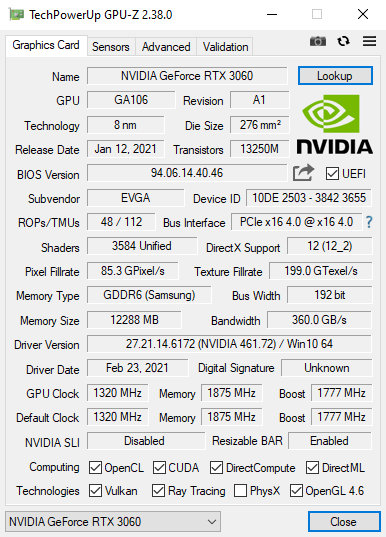
Main GPU Information
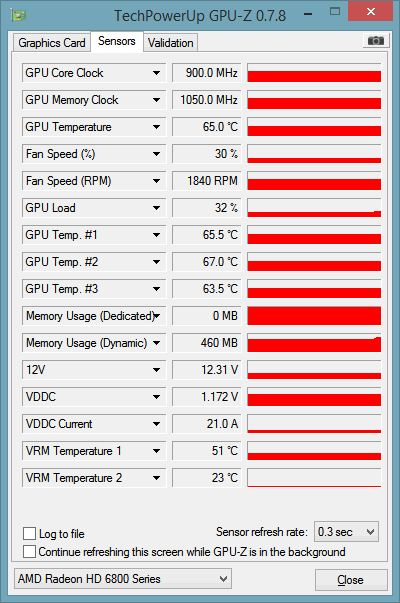
Sensors Monitoring
.jpg)
Advanced & Memory Details
About GPU-Z
GPU-Z is a lightweight, free and highly accurate graphics card information utility developed by TechPowerUp. It is the most popular and trusted tool among gamers, overclockers, cryptocurrency miners, PC builders and hardware enthusiasts for getting detailed real-time information about their GPU.
GPU-Z instantly shows comprehensive technical data about your graphics card including GPU model, codename, architecture, core clock, memory clock, memory type and size, bus width, temperature, fan speed, voltage, BIOS version and many other important specifications that are often hidden in Windows.
In version 2.60 (May 2026), GPU-Z received major improvements: better support for the latest NVIDIA, AMD and Intel Arc graphics cards, more accurate sensor readings, enhanced detection of modern GPU features, improved monitoring of ray tracing cores and AI accelerators, and a cleaner modern interface while keeping the classic simple design that users love.
GPU-Z is completely free for both personal and professional use. It contains no ads, no telemetry, no registration and offers a portable version that does not require installation. This makes it one of the most convenient and reliable graphics card diagnostic tools available in 2026.
Whether you are overclocking your GPU, checking compatibility before buying new hardware, monitoring temperatures during gaming, verifying mining performance or simply want to know exactly what graphics card is installed in your PC — GPU-Z delivers precise, real-time and easy-to-understand information in seconds.
Millions of users worldwide rely on GPU-Z every day because of its accuracy, speed and very low system resource usage. It is often used together with CPU-Z to get complete hardware information about the entire system.
Key Features
- Detailed GPU specifications and technical information (model, codename, architecture, transistor count, die size)
- Real-time monitoring of GPU temperature, fan speed, clock speeds, voltage and power consumption
- Memory type, size, clock speed, bandwidth and interface information
- Graphics card BIOS version, revision and VBIOS details
- Advanced tab with low-level hardware details and sensor monitoring
- Export detailed reports in TXT, HTML or CSV format for easy sharing
- Very lightweight and fast performance with minimal impact on system resources
- Portable version available — no installation required
System Requirements
GPU-Z is extremely lightweight and runs smoothly on both old and modern Windows systems. It has very modest requirements and does not slow down your computer even during long monitoring sessions.
- Windows 11 / Windows 10 / Windows 8.1 / Windows 7
- 512 MB RAM
- 20 MB free disk space
Alternatives to GPU-Z
If you are looking for other graphics card monitoring and information tools, here are the most popular alternatives to GPU-Z:
- HWMonitor — excellent real-time temperature and sensor monitoring for the entire system
- MSI Afterburner — powerful monitoring tool with overclocking capabilities
- GPU-Z + CPU-Z — best free combination for complete CPU + GPU hardware information
- Speccy — more user-friendly full system overview tool
- HWiNFO — very detailed and professional hardware information utility