
EasyCleaner 2.2
Latest version • Updated May 2026
EasyCleaner is a classic, lightweight and effective PC cleaner. It safely removes junk files, cleans the Windows registry, finds duplicate files and helps optimize system performance. Simple, fast and trusted by millions of users for over 15 years.
Download EasyCleaner FreeScreenshots of EasyCleaner
Here you can see how EasyCleaner looks and works. Clean, simple interface with powerful cleaning tools.
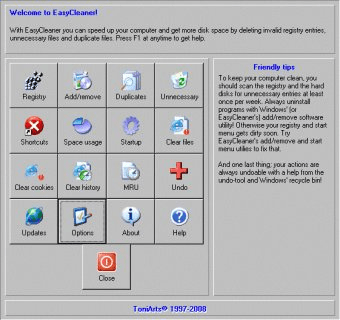
Main Interface
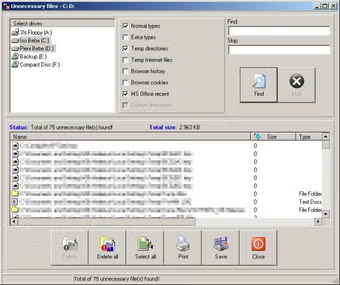
Registry Cleaner
.avif)
Duplicate Finder
About EasyCleaner
EasyCleaner is a classic, lightweight, and highly effective PC cleaning tool developed by ToniArts. For over 15 years it has helped millions of users around the world safely remove junk files, clean the Windows registry, find and delete duplicate files, manage startup programs, and keep their computer fast and optimized.
Unlike modern heavy all-in-one optimizers that try to do everything at once, EasyCleaner focuses on the most important cleaning tasks. It is simple, fast, and very reliable — exactly what many users need when they want a straightforward tool without unnecessary features, ads, or complicated interfaces.
In 2026 EasyCleaner remains surprisingly relevant. Many people still prefer it over newer programs because it is extremely lightweight, does not slow down the system during cleaning, and has a proven track record of safety. It works perfectly on both old Windows 7 machines and the latest Windows 11 systems.
EasyCleaner is especially popular among users who value simplicity and control. It does not force you to install extra modules, does not show aggressive upsells, and does not collect any telemetry. Everything is transparent, open, and focused purely on cleaning and optimizing your PC.
The program is particularly useful when your computer starts to feel slow, when the hard drive is almost full, or when you want to get rid of leftover files from previously uninstalled programs. EasyCleaner quickly scans the system and shows you exactly what can be safely removed, giving you full control over the cleaning process.
Why EasyCleaner is Still Popular in 2026
In an era of heavy “all-in-one” optimizers that often include unwanted extras, many users are returning to simple and honest tools like EasyCleaner. It does not try to be everything at once. It simply does its job very well: cleans junk, fixes registry issues, finds duplicates, and frees up disk space without any risk to system stability.
Key Features
- Smart cleaning of temporary files, cache, logs, and unnecessary system data
- Safe Windows registry cleaner with automatic backup before changes
- Duplicate files finder and remover to eliminate identical copies of files
- Startup programs manager to speed up boot time and reduce background load
- Browser history, cookies, and cache cleaner for all popular browsers
- Very low resource usage — the program is extremely lightweight
- Simple and intuitive interface suitable for both beginners and advanced users
- Portable version available — you can run it from a USB drive without installation
How EasyCleaner Works
EasyCleaner performs a thorough scan of your system and categorizes all unnecessary files. It shows you clear statistics: how much space you can free up, which files are safe to delete, and which ones you might want to keep. You can choose to clean everything with one click or review and select items manually for more control.
System Requirements
- Windows 11 / Windows 10 / Windows 8.1 / Windows 7
- 1 GB RAM
- 50 MB free disk space
Alternatives to EasyCleaner
- CCleaner Free — the most popular cleaner with a large user base
- Wise Disk Cleaner — faster and more modern interface
- BleachBit — powerful open-source cleaner with deeper privacy features
- PrivaZer — excellent tool for deep privacy cleaning and secure deletion