.png)
Bulk Rename Utility 4.0
Latest version • Updated May 2026
Bulk Rename Utility is the most powerful and popular tool to rename thousands of files and folders in seconds. Use powerful rules, regular expressions, numbering, dates, case conversion, EXIF metadata and much more.
Perfect for professional photographers, video editors, musicians, programmers and power users who need to organize large collections of files quickly, accurately and safely.
Real-time preview, undo support and portable version make it the safest and most flexible batch renamer available for Windows.
Download Bulk Rename Utility FreeScreenshots of Bulk Rename Utility
.jpg)
Main Interface
.jpg)
Rules & Preview
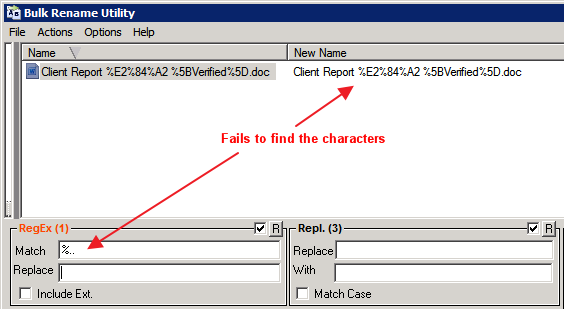
Regex Renaming
About Bulk Rename Utility
Bulk Rename Utility is the most powerful and popular batch file renaming tool for Windows. It allows you to rename thousands of files and folders instantly using a wide variety of rules, regular expressions, numbering, dates, EXIF metadata and more.
Professional photographers, video editors, musicians, programmers and power users rely on it daily to organize large collections of files quickly and accurately.
In version 4.0 (May 2026), Bulk Rename Utility received improved performance, better Windows 11 support, enhanced regex engine and new metadata options.
The free version is already extremely capable. The paid Pro version adds extra features such as saved presets, undo history and priority support.
Bulk Rename Utility has been the gold standard for batch file renaming for many years. While Windows built-in rename function is very limited and slow when working with hundreds or thousands of files, Bulk Rename Utility was specifically designed to handle massive renaming tasks with maximum speed, flexibility and safety.
The program supports an incredible number of renaming methods. You can use simple text replacement, add prefixes or suffixes, insert dates and times, automatically number files in sequence, change case (uppercase, lowercase, title case), remove or replace specific characters, and much more. The most powerful feature is full support for regular expressions (regex), which allows experienced users to create extremely complex and precise renaming rules that would be impossible with any other tool.
Photographers love Bulk Rename Utility because it can instantly rename thousands of RAW photos using EXIF data — adding shooting date, camera model, or sequential numbers. Video editors use it to organize large folders of footage with consistent naming patterns. Musicians rename entire music libraries using ID3 tags. Programmers and data analysts use regex to clean up log files, source code or exported datasets in seconds.
One of the biggest advantages is the real-time preview pane. Before applying any changes, you can see exactly how every file will be renamed. This eliminates almost all risk of mistakes. If something goes wrong, the built-in undo system and detailed history log let you revert changes instantly.
Bulk Rename Utility is also completely portable. There is no installation required — just run the executable file. This makes it perfect for using on different computers, USB drives, or even in a professional studio environment where you cannot install software.
The latest version 4.0 brings significant improvements: much faster processing of very large folders (tens of thousands of files), better Windows 11 compatibility, an enhanced regular expressions engine, new metadata fields, and a cleaner, more modern interface while keeping the powerful functionality that users have loved for years.
Many users report that Bulk Rename Utility saves them hours or even days of manual work. Instead of renaming files one by one, they can set up rules once and process entire collections in seconds. The program works with all common file types and supports network drives and external storage without any problems.
Safety is built into every part of the application. You can test rules, preview results, use the undo function, and even create backup copies of original filenames. This level of control and reliability is why Bulk Rename Utility remains the most trusted renaming tool among professionals and power users worldwide.
Whether you need to organize a huge photo archive, clean up a music collection, standardize filenames for a project, or process thousands of documents, Bulk Rename Utility is the fastest, most flexible and most reliable solution available in 2026.
Key Features
- Powerful renaming rules and filters
- Full regular expressions (regex) support
- Numbering, case conversion, date/time insertion
- EXIF, MP3, video metadata support
- Real-time preview of new names
- Undo and history system
- Portable version available
- Very fast even with tens of thousands of files
System Requirements
- Windows 11 / Windows 10 / Windows 8.1 / Windows 7
- 512 MB RAM
- 30 MB free disk space
Alternatives to Bulk Rename Utility
- Advanced Renamer — similar powerful tool
- ReNamer — flexible with presets
- File Renamer Basic — simpler interface
- PowerRename (Microsoft PowerToys) — built-in Windows tool